ChatGPT CodeX to Rhino Workflow
ChatGPT CodeX to Rhino Workflow
Couldn't load pickup availability
Learn how to use ChatGPT and Codex as AI agents for 3D modeling in Rhino and Grasshopper.
This focused 22-minute video tutorial walks you through a complete AI-assisted 3D modeling workflow — from connecting ChatGPT/Codex to Rhino through MCP, to creating editable 3D models from text and images, adding specialized Rhino skills, creating your own skills, and working with Grasshopper.
VIDEO LENGTH: 22 MINUTES
A concise, practical tutorial designed to help you understand and set up the workflow quickly.
Instead of modeling everything manually from scratch, you can describe what you want in natural language and let the AI agent help establish the model, automate repetitive tasks, and generate alternatives — while you stay in control of the design.
WHAT YOU’LL LEARN
01 — Introduction to AI Agent 3D Modeling
Explore how ChatGPT and Codex can work as AI agents for architectural 3D modeling and interact with professional design software.
02 — Connect ChatGPT / Codex to Rhino
Set up the ChatGPT desktop app, Codex, Rhino 8 and Rhino MCP.
Learn how MCP (Model Context Protocol) creates the connection between the AI agent and Rhino, allowing you to control modeling tasks through natural-language instructions.
03 — Text to 3D Model
Describe what you want to create and let the AI agent generate editable geometry directly in Rhino.
The tutorial starts with a simple object and then moves into architectural modeling to demonstrate how the workflow can be applied to more complex designs.
04 — Image to 3D Model
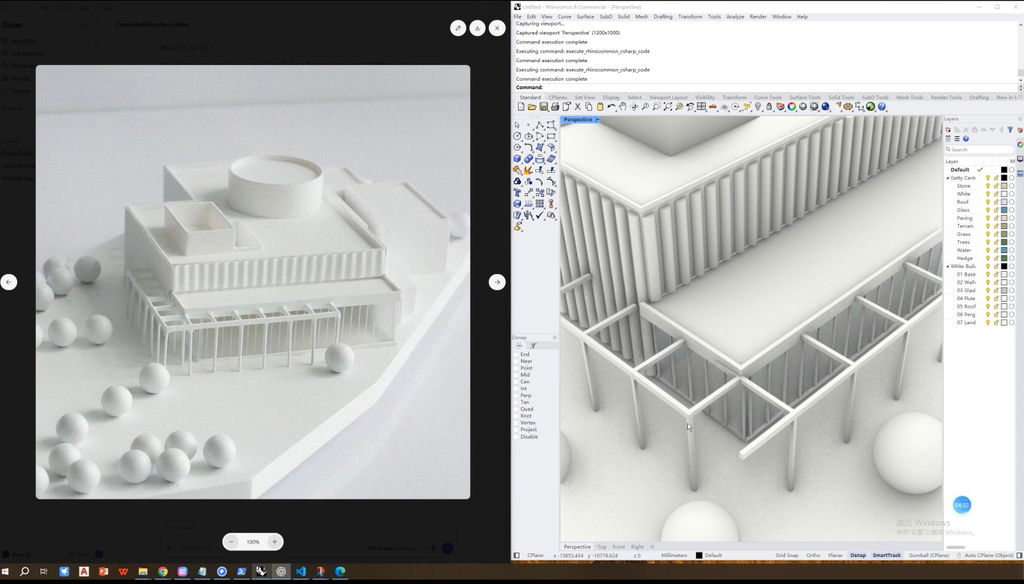
Upload photographs or reference images of an architectural model and ask the AI agent to recreate the design as an editable 3D model.
Continue the conversation to modify and refine the generated geometry.
05 — Add Specialized Rhino Skills
Make your AI agent more capable by adding specialized Rhino and Grasshopper skills.
Learn how to find existing skills, install them into ChatGPT, activate them, and use them to improve your 3D modeling workflow.
06 — Create Your Own AI Skill
If an existing skill doesn't match your workflow, create your own.
Use ChatGPT's Skill Creator to build a customized Rhino modeling skill based on your requirements and references.
07 — ChatGPT / Codex + Grasshopper
Connect your AI agent with Grasshopper for parametric modeling.
Ask the agent to create Grasshopper workflows using built-in components, or let it write a Python script and package the workflow into a GhPython component.
THE WORKFLOW
Prompt / Image
↓
ChatGPT & Codex
↓
MCP
↓
Rhino / Grasshopper
↓
Editable 3D Model
↓
Designer Refinement
WHAT IS MCP?
MCP stands for Model Context Protocol.
In this workflow, MCP acts as the bridge between ChatGPT/Codex and Rhino, allowing the AI agent to interact with the 3D modeling environment rather than simply giving you instructions in a chat window.
WHO IS THIS COURSE FOR?
• Architects
• Landscape architects
• Urban designers
• Architecture and design students
• Rhino and Grasshopper users
• Designers exploring ChatGPT and Codex
• Anyone interested in AI-assisted architectural 3D modeling
TOOLS COVERED
• ChatGPT Desktop App
• Codex
• Rhino 8
• Rhino MCP
• Model Context Protocol (MCP)
• Grasshopper
• GhPython
• ChatGPT Skills / Skill Creator
WHY LEARN AI AGENT 3D MODELING?
The goal isn't to replace the designer.
A more practical workflow is to use AI to establish the modeling foundation, handle repetitive operations, and generate different possibilities — then let the designer focus on program, circulation, spatial organization, form-making, and other decisions that give the project its character.
Idea → ChatGPT / Codex → Editable 3D Model → Designer Refinement
KEY TOPICS
ChatGPT for Architecture · Codex for Architecture · AI 3D Modeling · ChatGPT Rhino · Codex Rhino · Rhino AI · Rhino MCP · AI Agent for Rhino · AI Architecture Workflow · Text to 3D · Image to 3D · Grasshopper AI · AI Parametric Design · MCP for Architecture · AI Skills
22 minutes. One complete workflow. From prompt to editable 3D model.
Share


Super useful instructions! Following the course, we’ve built our own custom skills in our studio to help model our projects. :D
The course is very useful and follow the specific needs of Architects & architecture student and how to benefit from AI in Architecture in an easy way. But the course does not worth the course price (too high) , and such tutorials are very common on YouTube but in a more complicated explanation.
My recommendation is to low a bit the course prices and focus more on such courses (AI in Architecture) ; it will attract more people.
Thank you for your understanding
Finally, a tutorial that actually explains the process step by step, not just showing off fancy results and keeping the process a secret.